
What a great stream… It completely made your day. Every day is different and so are streams, but that one single stream was so good, that you keep coming back at it. And then suddenly, it’s gone. OH NO! If you only had a way to save it somehow.
Good news: you can prevent this in the future! Not with any sketchy third-party applications you can’t trust, which are saturated with spyware, aggressive toolbars, adware, and more. No, I will tell you the best and safest ways for a Twitch VOD download (and it’s free too, btw).
If there is an awesome stream, it is very understandable that you want to keep it so you can watch it again. There might be memories or events that you don’t want to forget. Other reasons you might want to download a Twitch VOD, can be because:
- You want to edit the video for YouTube or share it on any other platform
- You just want to keep your Twitch VOD forever (because on Twitch it stays for a maximum of 60 days if you are a Twitch Partner, or Turbo or Prime user)
Whether you are a streamer or a viewer, you'll get all you need to know to perform a Twitch VOD download.
P.S. One great solution I will mention also makes you able to download multiple streams at a time, and to only download a part of the stream (instead of the whole stream: it could be too much for your storage), etc.
Ready? Let’s get started!

NOT Recommended For A Twitch VOD Download
If you are a streamer, one thing you might want to do is to stream and record at the same time. This way, you will immediately have a file of your stream once you click ‘stop recording’. But I don’t recommend this. Why not? Because, unless you have an absolute beast of a PC that costs thousands of dollars, you won’t be able to stream in the best quality.
Your audience won’t get the best experience, your PC will suffer, and so will your gaming performance. It is better to stream with high performance and quality than to lower your stream quality so you can record at the same time. That's why I recommend doing your Twitch VOD download afterward, so you'll get both a high-quality video and a stream.
After all, isn't it nicer to publish and save a (part of) a Twitch stream that's high quality?
And who says you have the space on your computer to save all those streams after recording?

1st Way To Do A Twitch VOD Download
Now we’ll get to the best ways to perform a Twitch VOD download. This tip is for if you are a streamer. If not, then scroll down to the 2nd way to download a Twitch VOD.
The first way is to directly download your VODs from Twitch. You can only perform this when you have the option ‘Store past broadcasts’ activated. If you have streamed before with this setting turned off, your Twitch VODs won’t be saved on your channel.
You can find this setting when you click your profile icon on the top right, go to ‘Creator Dashboard’, click ‘Settings’ on the left, and then click on ‘Stream’. Here you will find ‘store past broadcasts’. Remember it will only save your Twitch VODs for 14 days if you aren't a Twitch partner, Prime, or Turbo user. Otherwise, it will save for 60 days.
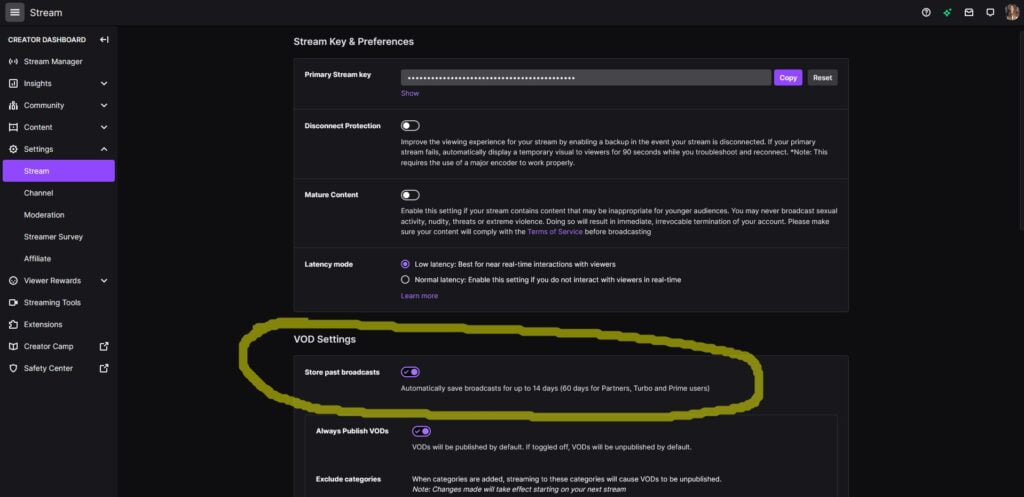
Do you have it enabled? Great, now your streams will be saved on your channel. You will find your stream videos when you click on ‘Content’ on the left, and then ‘Video Producer’. When you’re in Twitch, you can also immediately go to ‘Video Producer’ when you click your profile icon on the top right.
Next to each video, you will find 3 grey dots, where you can click on to download your Twitch stream. Be warned, it might take some time before your Twitch VOD download is finished. There’s a chance it stays on ‘preparing’ for a while.
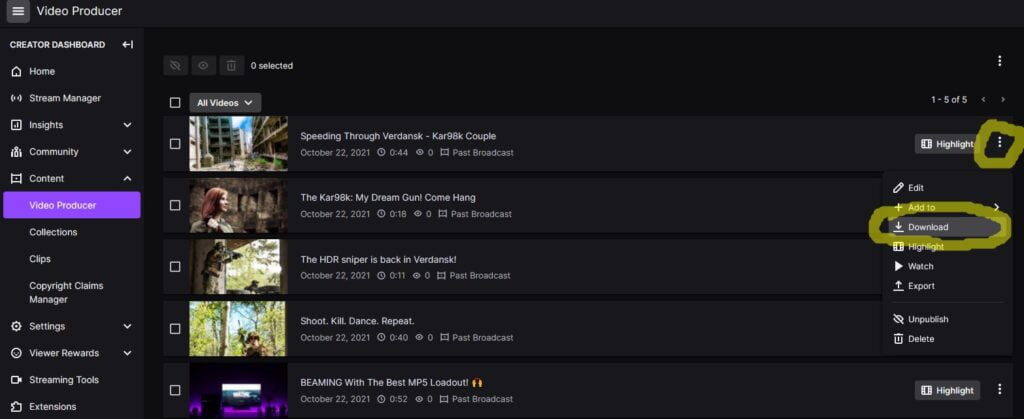
I’ve made a few streams to test, I haven’t been streaming recently. I’m more active on my YouTube Channel. Tip: You can also prepare multiple streams at the same time, by clicking ‘download’ on any Twitch VOD you’d like to download.
Quality Of A Twitch VOD Download Through Twitch
Before, the quality of downloaded Twitch VODs wasn't as good as it is right now. Because earlier these VODs were saved as a VLC file. Nowadays, a Twitch VOD download is in good quality. I noticed that Twitch videos are saved as an MP4 file. And for YouTube, an MP4 format is a preffered format.
Twitch VOD Download VS Export
Maybe you have also noticed an ‘Export’ option besides the ‘Download’ option. This means that you can directly export your stream to YouTube if you'd like to. Then you can fill in a form with a title, description, tags, choose your visibility and if you'd like to you can split the video into 15 minutes segments.
In my opinion, it is a nice addition to efficiently publish your Twitch streams to YouTube. But I wouldn’t use this option. Because you won’t be able to choose a thumbnail, you can’t schedule it or add it to a playlist. In short: you can’t use all the customizable features for YouTube.
That’s why I prefer to do a Twitch VOD download, and then edit and publish (a part of) the stream afterward.

2nd Way To Do A Twitch VOD Download
This is where it starts to get interesting. This is what you could do if you are a viewer, but you can also use it as a streamer. As told before, it's possible that downloading from Twitch doesn’t give you the best quality format for YouTube, and probably not for editing programs as well.
So how can you download any Twitch VOD you like? Whilst maintaining the best quality? With Twitch Leecher.
Twitch Leecher
After reviewing a lot of tools and programs that say they can help you with a Twitch VOD download, Twitch Leecher came out the best. A lot of the existing VOD downloaders out there either work horribly or don't work at all. Or you will encounter spyware, adware, and other things you don't want to get on your PC.
Is Twitch Leecher Trustworthy?
Twitch Leecher is made by an experienced Software Developer called Dominik Rebitzer, using the name 'Franiac' online. And the good thing? He keeps Twitch Leecher up to date for us. At this time writing, the latest update has been in March. This means that the program won't be outdated and keeps up with all the Twitch updates to function properly.
Why did he decide to create Twitch Leecher? He says that he encountered lots of horribly programmed tools and that he had problems with recording his stream locally while streaming. He knew there were many people out there who want to download past broadcasts or highlights from Twitch.
That's why he decided to create Twitch Leecher. With all kinds of options built-in to suit your needs.
What Can You Do With Twitch Leecher?
Twitch Leecher is designed to be easy to use (you don’t need a manual), it is stylish, it’s free, and open-source software. Also, Dominik says that Twitch Leecher has a download speed that’s up to 20 times faster compared to direct download with FFMPEG (which is a command-line tool that converts video or audio formats).
Other great options you can do with Twitch Leecher, are:
- The option to select the time for the Twitch VOD download
- The option to queue multiple downloads
- The option to browse past broadcasts and highlights WITHIN the application
What about Dominik, does he still use the software himself?
Dominik doesn't use the software himself anymore, as he seems to be recording and streaming at the same time now. I assume he has a beast PC or he doesn't necessarily need the best Full HD quality. But, he still keeps Twitch Leecher up to date for us. It's great that these kinds of people still exist, to be honest.
How To Do A Twitch VOD Download With Twitch Leecher
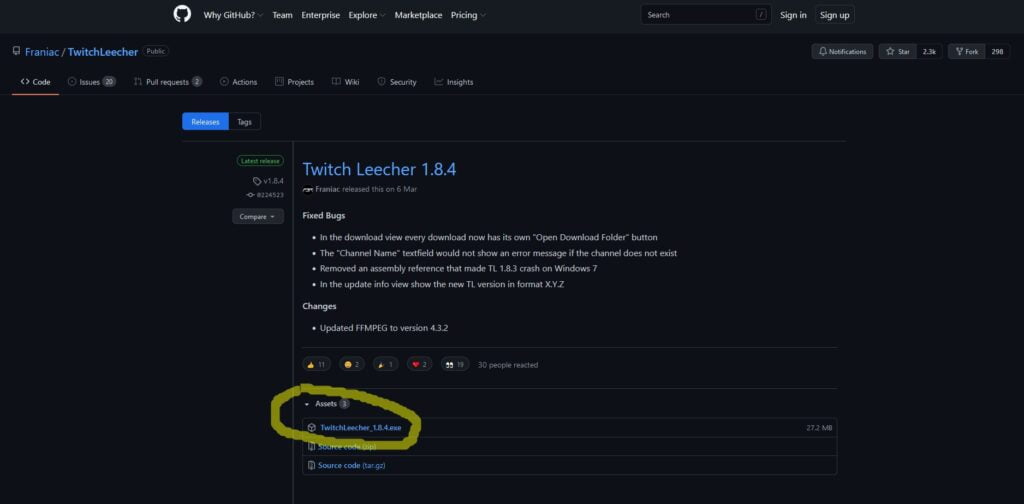
First, you'll need to get Twitch Leecher. When you click here, I will redirect you to the page you need to be on. On top, you'll find the latest release, and underneath you can click 'TwitchLeecher_1.8.4.exe' or a newer version when you're reading this article further in time. I hope Dominik will keep bringing updates for Twitch Leecher for the years to come.
Twitch VOD Download By URL
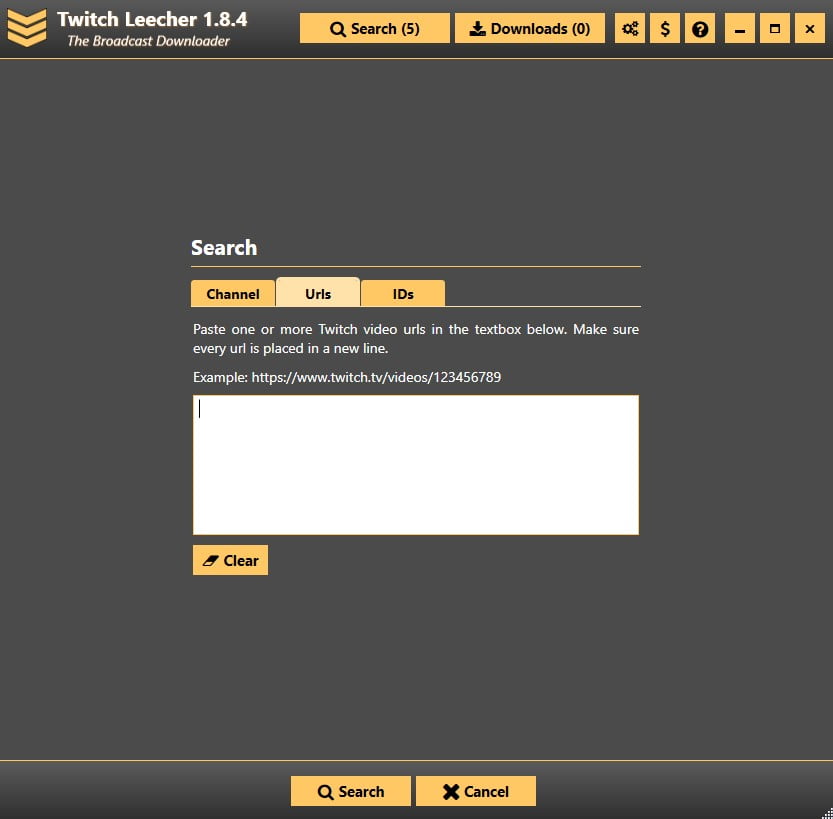
Now, the easiest way of downloading a Twitch VOD is to click on ‘Search’ and then click on the ‘Urls’ tab. Here you can paste the URL of the Twitch VOD you’d like to download. So you first have to go to Twitch, go to the channel where you want to do a Twitch VOD download from, click videos and then click the video you’d like to download. Copy that URL and paste it into Twitch Leecher. Then click ‘Search’ and you will be able to download this video.
Btw, you might think: Hehe, now I can perform a Twitch VOD download that's for subscribers only. Wrong! Twitch is strictly against this, of course, as it is not conforming to the rules. When you try to download a Twitch VOD that’s for subscribers only, you will get this message:
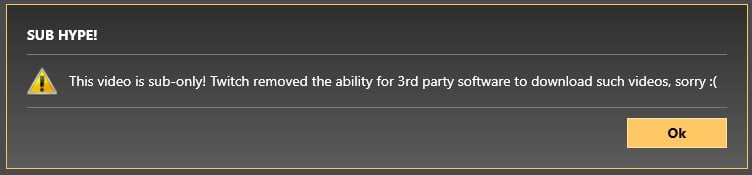
Well done, Dominik. This is how trustworthy third-party software should be.
Twitch VOD Channel Name
Besides doing a Twitch VOD download by URL, you can do this by channel name as well. Simply type in the channel name you’d like to download a stream from. Select the period of the streams you’d like to see, or simply select ‘last … VODs’ or ‘only today’. Then download the stream(s) you’d like to get.

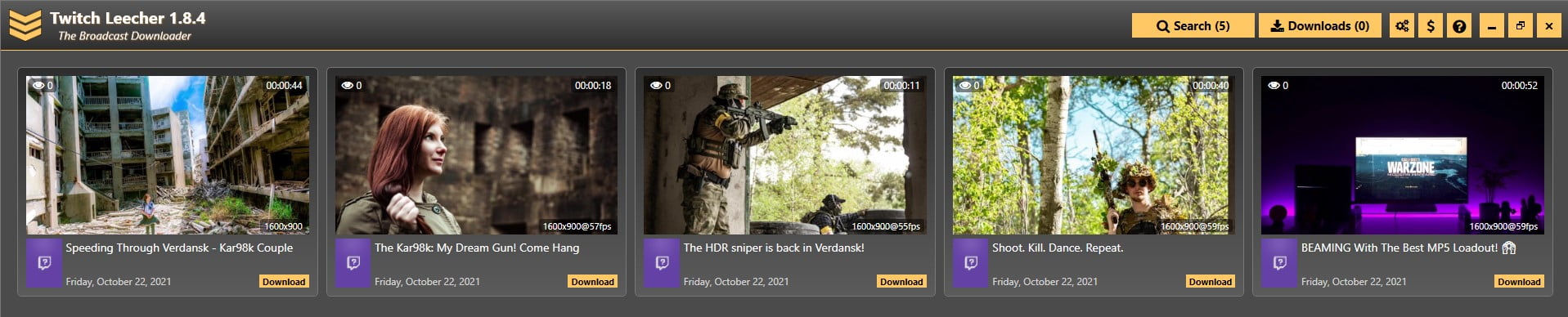
What’s awesome, is that after you click on download, you’ll notice that can crop the video. This means you will only download a part of the stream you like. Great feature! You can also choose your quality.
Note that your Twitch VOD download won’t be higher quality than the resolution of the streamer. If you just want to get a clip for TikTok or Twitter, for example, then 720p could be better. You don't need a Full HD video for that. If necessary, change the directory where you want the video to go and change the filename so you know what the download is about.
You'll find your downloads on the top right under 'Downloads' and here you can queue your downloads as well if you'd like to.
Tip: When you go to settings within Twitch Leecher, you can type in your favorite channels. This way, when you search for a channel, these names will automatically come up which makes it a little bit easier for you.
More interesting articles for you!
Now you know how you can download Twitch VODs in the best quality possible, in the safest way. Again, I hope that Dominik (the developer of Twitch Leecher) will keep bringing updates for us.
I hope this was helpful to you! If you have any questions feel free to leave a comment down below and I'll make sure to respond to you.
I think these other articles might interest you as well:
- Twitch VS YouTube: Which is the most profitable?
- How to increase your Twitch following
- The lightest gaming mouse in the world
- Why Rogue Energy is effective & healthy
Stay blessed!